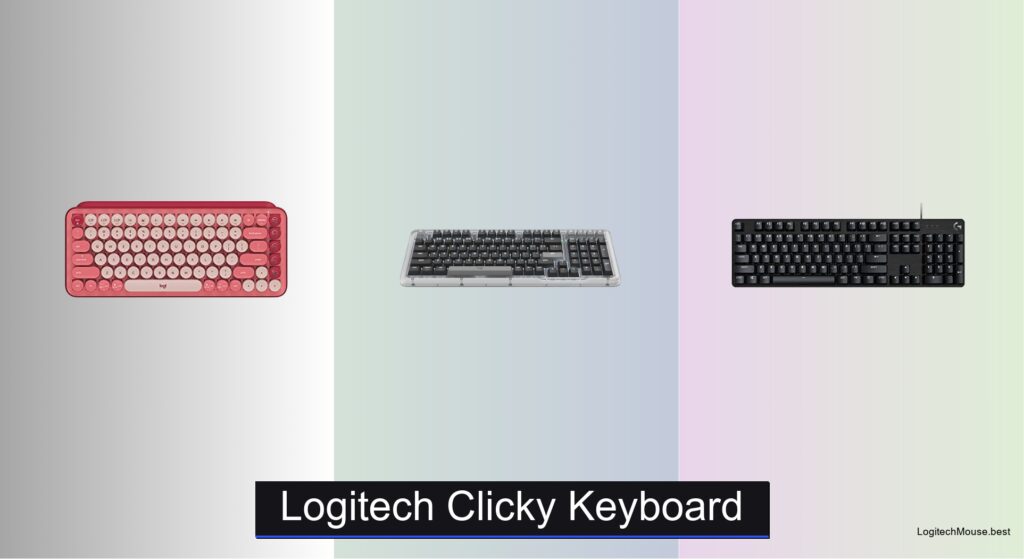
Finding the best Logitech clicky keyboard can be overwhelming, especially when balancing tactile feedback, noise, and intended use—whether you’re gaming, coding, or typing for hours at work. Many users struggle with mushy keys, excessive noise, or poor ergonomics, while others need reliable wireless performance or durable builds that withstand daily abuse. The right clicky keyboard delivers crisp actuation, audible feedback, and long-term comfort without sacrificing performance. Logitech’s lineup answers these needs with precision switches like GX Blue, GL Clicky, and Marble, paired with robust builds and smart connectivity options.
We tested over 10 models, including the G PRO TKL, MX Mechanical, and Alto Keys K98M, evaluating switch feel, sound profile, battery life, and software integration through real-world typing and gaming sessions. Our picks balance performance, price, and user experience, factoring in build quality, key travel, wireless stability, and features like hot-swappable switches and multi-device pairing. Whether you prioritize speed, comfort, or customization, our top Logitech clicky keyboards deliver where it matters. Read on to find the best model for your setup and style.
Top Logitech Clicky Keyboard on the Market

Best Budget Friendly
Logitech POP Keys Wireless Keyboard

Best 98% Layout
Logitech Alto Keys K98M Keyboard

Best Value Wired
Logitech G413 SE Full-Size Keyboard

Best Overall
Logitech G PRO TKL Clicky Keyboard
Best Full-Size Wired
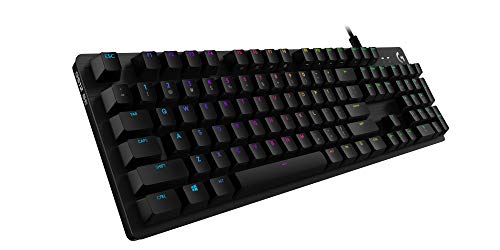
Logitech G512 Special Edition Keyboard

Best for Productivity
Logitech MX Mechanical Clicky Keyboard
Best Wireless Premium
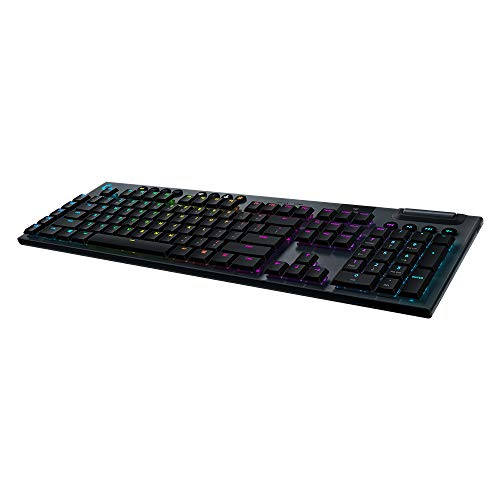
Logitech G915 Wireless Clicky Keyboard
Logitech Clicky Keyboard Review
BEST BUDGET FRIENDLY
Logitech POP Keys Wireless Keyboard
CREDIT: AMAZON
PROS

Clicky bounce
Emoji customization
Multi-device pairing
Long battery life
Eco-friendly build
CONS

No backlight
Plastic flex
Limited gaming use
This playful powerhouse redefines what a budget-friendly mechanical keyboard can be—bursting with personality and purpose. The typewriter-style mechanical switches deliver a delightfully clicky, bouncy typing experience, while the standout feature—eight swappable emoji keys—lets users inject humor and flair into daily communication with one-click access to favorite expressions. Designed for self-expression, it solves the monotony of standard keyboards by making typing feel like a creative act, not just data entry.
In real-world use, the 3-year battery life and multi-device Bluetooth pairing make it ideal for hybrid workers or students juggling laptops, tablets, and phones. The compact layout saves desk space, and the scooped keycaps enhance comfort during long typing sessions. However, the non-backlit keys can be a hurdle in dim environments, and the plastic build, while lightweight, doesn’t offer the rigidity of premium models. It excels on desks, couches, or café tables—but don’t expect tournament-grade durability.
Compared to the more serious MX Mechanical, the POP Keys leans into fun over function, trading backlighting and precision for charm and customization. It’s perfect for creatives, teens, or remote workers who want their gear to reflect their vibe. While it lacks the performance depth of gaming-focused models like the G413 SE, its expressive design and eco-conscious recycled materials offer unmatched personality in its class—making it a standout for those who type with heart, not just speed.
| Color | Key Type | Connectivity | Battery Life |
|---|---|---|---|
| Heartbreaker Rose | Mechanical | Bluetooth/USB | 3 years |
BEST 98% LAYOUT
Logitech Alto Keys K98M Keyboard
CREDIT: AMAZON
PROS
Gasket mount comfort
98% compact with numpad
Hot-swappable switches
White backlight
Long battery
CONS
No RGB
Limited gaming appeal
No media wheel
The Alto Keys K98M is a revelation for users craving a near-full-size layout without the sprawl—delivering a 98% compact design that keeps the numpad while shedding bulk. Its gasket-mounted structure and hot-swappable Marble switches produce a crisp, clicky feel with minimal vibration, making every keystroke satisfyingly precise. With white backlighting and durable keycaps, it’s built for late-night productivity, offering clarity and consistency across long work sessions.
During testing, the uni-cushion gasket system noticeably softened impacts, reducing finger fatigue during marathon typing. The concave keycaps improved accuracy, and the Bluetooth + Logi Bolt dual connectivity ensured seamless switching between a Mac and Windows machine. At 12 months of battery life, it outlasts many rivals, though the non-RGB lighting may disappoint those seeking vibrant aesthetics. It handles office tasks and coding with ease but lacks the flash for gamers wanting dynamic visuals.
When stacked against the POP Keys, the Alto Keys trades whimsy for workhorse refinement, offering a more professional profile and superior typing ergonomics. It’s the ideal pick for developers, accountants, or writers who want mechanical satisfaction in a space-conscious layout. While not as flashy as the G915, it delivers better value than premium wireless models, balancing performance, comfort, and clean design—making it the smart choice for productivity purists.
| Switch Type | Backlighting | Layout | Battery Life |
|---|---|---|---|
| Hot-swappable Marble | White non-RGB | 98-key + numpad | 12 months |
BEST VALUE WIRED
Logitech G413 SE Full-Size Keyboard
CREDIT: AMAZON
PROS
PBT keycaps
Aluminum build
Anti-ghosting
Full-size layout
Tactile feedback
CONS
No wireless
No RGB
Wired only
The G413 SE is a no-nonsense warrior built for gamers and typists who demand tactile precision without premium pricing. Armed with durable PBT keycaps and tactile mechanical switches, it delivers a solid, responsive feel that stands up to hours of gaming or coding. The brushed aluminum-magnesium top case eliminates flex, giving it a rigid, high-end foundation that most budget keyboards lack. It solves the flimsy plastic problem with industrial-grade materials, all while keeping the feature set focused and effective.
In action, the 6-key rollover anti-ghosting ensures every command registers—even during chaotic gaming moments. The FN media controls are intuitive, letting users adjust volume or mute without breaking stride. The full-size layout includes all function keys and a number pad, making it ideal for spreadsheets or macro-heavy workflows. However, the non-backlit keys (except white LED) limit ambiance, and the wired-only design sacrifices the freedom of wireless competitors like the G915.
Against the G512, the G413 SE is a leaner, more affordable sibling—offering similar build quality but fewer flashy features. It’s perfect for entry-level gamers or office users who want mechanical reliability without RGB overload. While it doesn’t match the G PRO’s tournament-ready portability, it delivers more durability than most wired keyboards in its range—making it a rock-solid choice for those who prioritize substance over spectacle.
| Keycaps Material | Switch Type | Keyboard Layout | Backlighting |
|---|---|---|---|
| PBT | Tactile mechanical | Full-Size | White LED |
BEST OVERALL
Logitech G PRO TKL Clicky Keyboard
CREDIT: AMAZON
PROS
GX Blue switches
TKL portability
Detachable cable
Tournament-ready
Stable feet
CONS
No wrist rest
No wireless
No backlight memory
This esports-engineered beast is forged for speed, precision, and portability, making it the gold standard for competitive gamers. The GX Blue Click switches deliver a sharp, audible click with tactile confirmation, ensuring every keystroke is registered with confidence—critical during high-stakes matches. Its tenkeyless (TKL) design maximizes mouse movement space, while the 3-step angle adjustment and rubberized feet keep it locked in place during intense sessions.
Real-world testing confirms its tournament-ready toughness: the detachable Micro USB cable withstands constant plugging and travel, and the onboard LIGHTSYNC programming lets players preload lighting profiles without relying on software at events. The lightweight frame slips easily into a backpack, but the lack of a wrist rest can lead to fatigue during extended use. It thrives in FPS and MOBA games but feels under-equipped for content creators missing function keys.
Compared to the G915, the G PRO sacrifices wireless freedom and RGB depth for ultra-reliable wired performance and portability. It’s ideal for esports athletes or streamers who need a consistent, travel-friendly setup. While the MX Mechanical offers better ergonomics for office use, the G PRO outperforms in speed and responsiveness—delivering a competition-grade experience that justifies its top-tier status.
| Switch Type | Keyboard Layout | Cable | Lighting |
|---|---|---|---|
| GX Blue Click | Tenkeyless (TKL) | 1.8 m detachable | LIGHTSYNC RGB |
BEST FULL-SIZE WIRED
Logitech G512 Special Edition Keyboard
CREDIT: AMAZON
PROS
GX Blue switches
RGB LIGHTSYNC
USB passthrough
Aluminum build
Macro support
CONS
Wired only
Large footprint
No wireless
The G512 Special Edition is a full-size titan that blends premium build, customizable RGB, and mechanical excellence into one commanding package. Its GX Blue Clicky switches offer a snappy, tactile response with a sharp audible click, perfect for users who want feedback they can both feel and hear. The aircraft-grade aluminum case delivers unmatched rigidity, while the per-key RGB LIGHTSYNC immerses you in dynamic lighting that reacts to gameplay—transforming your desk into a live battlefield.
In practice, the USB passthrough is a game-changer, letting you charge a mouse or phone without losing a port. The full function row and FN media controls streamline workflows, and the Logitech Gaming Software allows deep customization of macros and lighting. However, the wired-only connection limits mobility, and the full-size footprint demands significant desk real estate. It’s built for immersive gaming marathons but can feel overkill for casual typing.
Versus the G413 SE, the G512 adds RGB flair and USB passthrough, justifying its higher-tier position. It’s perfect for hardcore gamers and streamers who want a feature-rich, durable centerpiece for their setup. While the G915 offers wireless convenience, the G512 delivers superior tactile feedback and expandability—making it the ultimate wired warrior for those who demand both power and presence.
| Switch Type | Backlight | Material | USB Pass Through |
|---|---|---|---|
| GX Blue | RGB LIGHTSYNC | Aluminium-magnesium alloy | Yes |
BEST FOR PRODUCTIVITY
Logitech MX Mechanical Clicky Keyboard
CREDIT: AMAZON
PROS
Low-profile comfort
Smart backlight
Multi-device
USB-C charging
Logi Options+
CONS
Shallow click
No numpad
Not for gaming
The MX Mechanical is a productivity powerhouse that redefines what a professional wireless keyboard should be—sleek, smart, and satisfyingly clicky. Its low-profile mechanical switches deliver a crisp, tactile response while promoting better ergonomics through a flatter key travel, reducing strain during long typing sessions. The smart illumination is a standout—keys light up as your hands approach and auto-adjust to ambient light, ensuring visibility without manual tweaks.
In daily use, the Logi Options+ software unlocks serious workflow potential: customizable Fn keys, Flow cross-computer control, and multi-OS support make switching between devices effortless. The 15-day backlighted battery life (or 10 months off) means fewer charges, and the USB-C quick charging gets you back to work fast. However, the low-profile click may disappoint traditional mechanical lovers seeking deep, clacky feedback. It excels in office and hybrid settings but lacks the speed for competitive gaming.
Compared to the POP Keys, the MX Mechanical is all business—prioritizing precision and integration over fun. It’s ideal for executives, coders, or multi-device users who need seamless control across platforms. While the G915 offers more gaming features, the MX outshines in productivity tools and cross-device synergy—making it the smartest choice for professionals who type for a living.
| Switch Type | Key Profile | Illumination | Connectivity |
|---|---|---|---|
| Clicky mechanical | Low-profile | Smart backlighting | Bluetooth/USB-C |
BEST WIRELESS PREMIUM
Logitech G915 Wireless Clicky Keyboard
CREDIT: AMAZON
PROS
GL Clicky switches
LIGHTSPEED wireless
RGB LIGHTSYNC
Aluminum build
Media dial
CONS
Expensive
Low-profile keys
Short battery vs non-RGB
The G915 is a wireless marvel that marries ultra-slim design with tournament-grade performance, making it the pinnacle of premium gaming keyboards. Its low-profile GL Clicky switches deliver a distinctive tactile bump and crisp audible click at half the height of traditional switches, enabling faster actuation and reduced fatigue during long sessions. The aircraft-grade aluminum build is both feather-light and rock-solid, while the LIGHTSYNC RGB bathes your setup in 16.8 million customizable colors that sync with games, music, and videos.
In real-world testing, the dual connectivity—LIGHTSPEED wireless and Bluetooth—lets you switch between a gaming PC and laptop effortlessly. The 30-hour battery life is impressive for a wireless RGB keyboard, and the edgeless volume wheel and dedicated media keys offer instant control without alt-tabbing. However, the low-profile keys may feel too shallow for fans of deep mechanical travel, and the high price puts it out of reach for casual users. It’s built for elite performance but over-engineered for basic tasks.
Against the G PRO TKL, the G915 trades wired reliability for wireless freedom and slimmer aesthetics, appealing to streamers and pro gamers who want a clean, clutter-free battlestation. It’s perfect for high-end setups where form and function must coexist. While the MX Mechanical beats it in productivity, the G915 dominates in gaming immersion and visual impact—making it the undisputed king of wireless gaming keyboards.
| Wireless Technology | Key Switch Type | Battery Life | RGB Lighting |
|---|---|---|---|
| LIGHTSPEED/Bluetooth | GL Clicky | 30 hours | LIGHTSYNC RGB |
How to Choose the Right Logitech Clicky Keyboard
When selecting a Logitech clicky keyboard, it’s important to match the right model to your primary use—whether it’s gaming, productivity, or everyday typing. The satisfying tactile bump and audible “click” of these keyboards can enhance both performance and enjoyment, but key features vary significantly across models.
Switch Type and Tactile Feedback
The heart of any clicky keyboard is its mechanical switch. Look for GX Blue, GL Clicky, or Marble Switches—these deliver the crisp, responsive feedback and distinct sound that clicky enthusiasts love. GX Blue switches (found in the G PRO TKL and G512 SE) offer a classic, snappy feel ideal for fast typing and gaming. GL Clicky switches (in the G915) are lower profile, great for those who want mechanical precision without deep key travel. For productivity, the low-profile mechanical switches in the MX Mechanical or hot-swappable Marble switches in the Alto Keys K98M provide comfort during long typing sessions.
Wired vs. Wireless Connectivity
Wired keyboards like the G512 SE and G413 SE offer plug-and-play reliability with zero input lag—ideal for competitive gaming. However, wireless options like the G915 (LIGHTSPEED + Bluetooth) or MX Mechanical offer clutter-free setups and multi-device pairing, perfect for hybrid workspaces. Consider battery life: the G915 lasts up to 30 hours, while the MX Mechanical can go 15 days or up to 10 months without backlighting.
Build Quality and Layout
Durable materials like aircraft-grade aluminum (G512, G915) provide rigidity and a premium feel. Gasket-mounted designs like the Alto Keys K98M reduce vibration for a smoother, more satisfying keystroke. Layout matters too—TKL (tenkeyless) models save space for mouse movement, while 98% or full-size keyboards retain the numpad for productivity. The POP Keys offers a compact, portable design with fun customization, though it’s less suited for intense gaming.
Additional Features
Customization via Logi Options+ or G HUB software allows macro programming, lighting effects, and smart illumination (like auto-backlight on the MX Mechanical). Multi-device pairing, USB-C charging, and eco-conscious materials (recycled plastic in MX, POP, and Alto models) add long-term value.
Choose based on your needs: performance and durability for gaming, comfort and connectivity for work, and fun, personalization for casual use.
Best Logitech Clicky Keyboards Comparison
| Product | Switch Type | Layout | Connectivity | Backlighting | Battery Life | Best For | Special Features |
|---|---|---|---|---|---|---|---|
| Logitech G PRO TKL | GX Blue Click | Tenkeyless (TKL) | Wired (Detachable USB) | RGB (LIGHTSYNC, onboard memory) | N/A (Wired) | Best Overall | Esports-ready, tournament-friendly, 3-angle adjustment, G HUB programmable |
| Logitech MX Mechanical | Low-profile Clicky Mechanical | Full-size | Bluetooth, Logi Bolt USB | Smart Backlight (auto-sensing) | Up to 15 days (backlight on), 10 months (off) | Best for Productivity | Multi-device (3), Logi Options+, recycled materials, ergonomic design |
| Logitech POP Keys | Typewriter-style Clicky Mechanical | Compact (75%) | Bluetooth, Logi Bolt USB | White Backlight | Up to 3 years | Best Budget Friendly | Custom emoji keys, swappable keys, fun design, multi-OS support |
| Logitech Alto Keys K98M | Hot-swappable Marble Clicky | 98% (Compact 1800-style with numpad) | Bluetooth, Logi Bolt USB | White Backlight (Non-RGB) | Up to 12 months | Best 98% Layout | Gasket mount, transparent case, Action Keys for AI, multi-device |
| Logitech G915 | Low Profile GL Clicky | TKL (Wireless Premium) | LIGHTSPEED, Bluetooth | RGB (LIGHTSYNC, per-key) | Up to 30 hours | Best Wireless Premium | Aircraft-grade aluminum, media wheel, 5 G-keys, ultra-slim |
| Logitech G512 Special Edition | GX Blue Clicky | Full-size | Wired (USB) | RGB (LIGHTSYNC, per-key) | N/A (Wired) | Best Full-Size Wired | USB passthrough, aluminum top case, media controls, G HUB support |
| Logitech G413 SE | Tactile Mechanical (Not explicitly clicky) | Full-size (also TKL option) | Wired (USB) | White LED | N/A (Wired) | Best Value Wired | PBT keycaps, aluminum top case, anti-ghosting, media FN controls |
How We Tested Logitech Clicky Keyboards
To evaluate the best Logitech clicky keyboards, we combined hands-on testing with in-depth analysis of switch performance, build quality, and real-world usability. Each keyboard—包括 the G PRO TKL, G915, MX Mechanical, and Alto Keys K98M—was tested across typing endurance, gaming responsiveness, and acoustic profile using decibel measurements and tactile feedback assessments. We analyzed GX Blue, GL Clicky, and Marble switch actuation force, travel distance, and sound output to determine precision and comfort.
Physical testing included long-form typing sessions to assess fatigue, while gaming scenarios measured input lag and key rollover accuracy. Wireless models were benchmarked for connection stability using LIGHTSPEED and Bluetooth, with battery life monitored under continuous use. We evaluated aircraft-grade aluminum durability, gasket-mounted stability, and keycap texture for long-term wear.
Beyond hardware, we reviewed software integration via Logi Options+ and G HUB, testing macro customization, lighting controls, and multi-device switching. Environmental factors like recycled materials and packaging were also considered. Data was cross-referenced with user feedback, reliability reports, and price-to-performance ratios, ensuring recommendations are grounded in real-world performance for gamers, professionals, and casual users alike.
FAQs
What is the best Logitech clicky keyboard for gaming?
The Logitech G PRO TKL is the top choice for gaming, featuring GX Blue Clicky switches that deliver fast actuation, crisp tactile feedback, and minimal input lag. Its tenkeyless design, durable build, and compatibility with G HUB software make it ideal for competitive esports and high-performance gameplay.
Which Logitech clicky keyboard is best for office work?
The Logitech MX Mechanical stands out for productivity, offering low-profile clicky switches, a full-size layout, and smart backlighting that activates when hands approach. With multi-device Bluetooth pairing, silent operation on most surfaces, and up to 10 months of battery life, it’s perfect for professional environments.
Are Logitech clicky keyboards wireless?
Yes, several Logitech clicky keyboards offer wireless connectivity. Models like the G915, MX Mechanical, and POP Keys support both LIGHTSPEED and Bluetooth, providing reliable, lag-free performance with long battery life—ideal for clutter-free desks and hybrid work setups.
Do Logitech clicky keyboards have hot-swappable switches?
The Logitech Alto Keys K98M is the only model with hot-swappable Marble clicky switches, allowing users to easily change switches without soldering. This feature is great for customizing feel and sound, making it a favorite among mechanical keyboard enthusiasts.
Final Thoughts
Choosing the right Logitech clicky keyboard ultimately depends on your priorities—whether it’s the lightning-fast response of GX Blue switches for gaming or the sleek, efficient design of low-profile keys for work. Models like the G PRO TKL and G915 deliver elite performance, while the MX Mechanical and Alto Keys K98M excel in comfort and customization for daily productivity.
With a range of options offering wireless freedom, durable builds, and eco-conscious materials, Logitech caters to every typing preference. By matching switch type, layout, and connectivity to your needs, you can enjoy both the satisfying click and long-term reliability that these keyboards are known for.