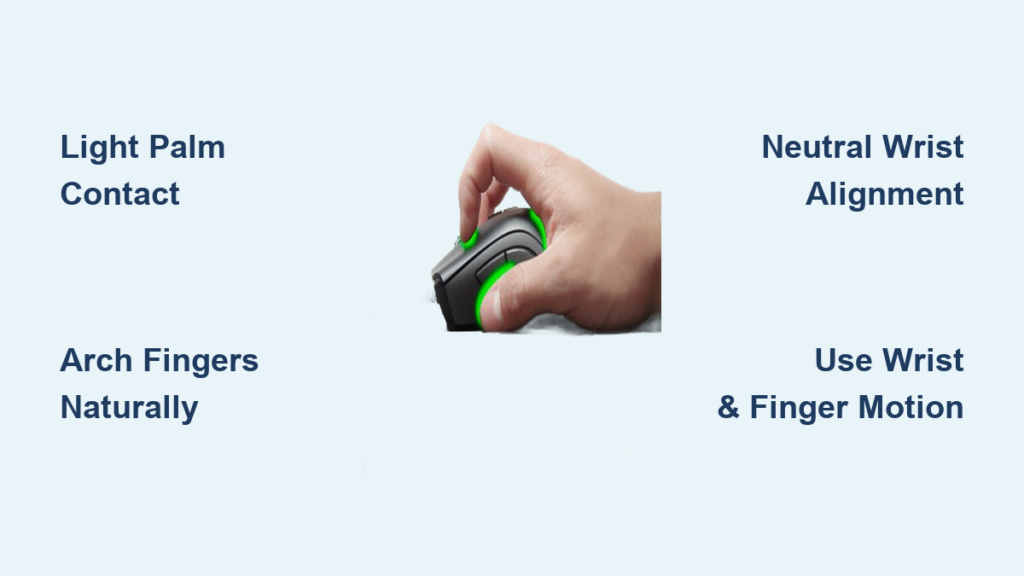
Missing flicks in ranked matches or struggling to track moving targets? Your mouse grip might be holding you back. Learning how to claw grip mouse properly is one of the most effective ways to boost speed and precision in competitive games. Many FPS and MOBA players rely on this technique because it balances quick reactions with steady control.
In this guide, you’ll learn the exact hand placement, finger positioning, and wrist alignment needed to master the claw grip. You’ll also discover the best mice for this style, common mistakes to avoid, and practice drills to build muscle memory. By the end, you’ll have a complete setup plan tailored for comfort, speed, and long gaming sessions without strain.
Master the Claw Grip Posture
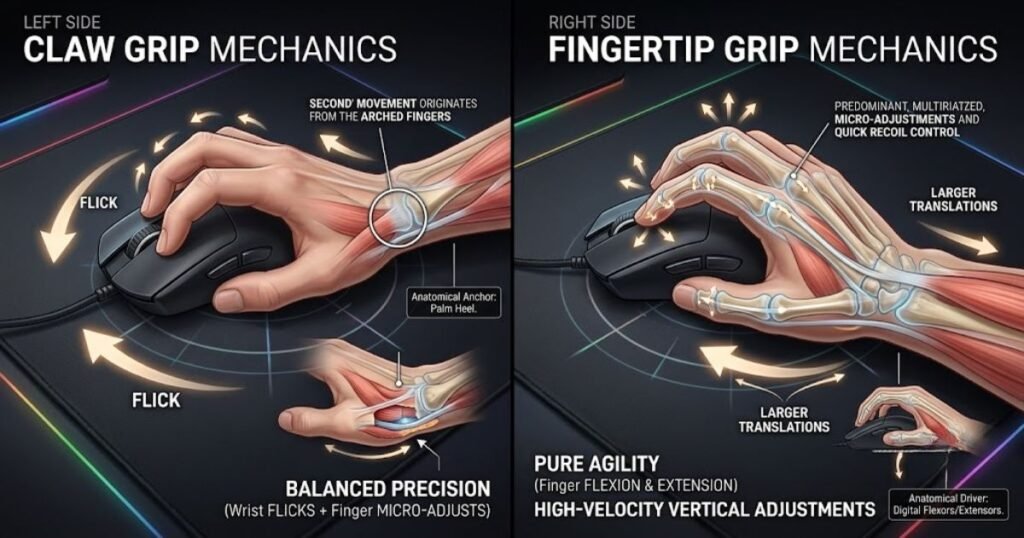
The claw grip creates an arched hand position that blends stability with responsiveness. Your palm lightly touches the back of the mouse while your fingers hover above the buttons in a natural curve, similar to holding a small ball. This setup allows fast wrist flicks while keeping enough surface contact for accurate aiming.
Unlike palm grip users who depend on forearm movement, claw grippers use a hybrid of wrist and finger motion. This makes it ideal for games requiring both micro-adjustments and sudden directional changes. The key is light contact and relaxed tension. Over-gripping is the most common mistake and leads to fatigue and shaky aim.
Position Your Palm Correctly
Only the heel of your palm, the fleshy base near your wrist, should touch the mouse. It acts as a pivot point, not a full support. If your entire palm rests on the mouse, you’re leaning toward a palm grip. Lift the front half of your hand slightly until only the back edge makes contact.
This light palm contact stabilizes the mouse during flicks without anchoring you down. For ergonomic mice like the Razer Deathadder or Ninjutso Sora V2, the rear hump naturally supports this heel-down position. Avoid letting the bottom of your hand drag across the mousepad. Your hand should float, supported only by the mouse feet.
Curve Your Fingers Naturally
Your fingers should form a gentle arch, not a rigid claw or flat line. Imagine holding an egg: tight enough to control it, but not so hard that you crush it. Over-bending or locking fingers creates tension that slows reaction time and increases fatigue.
- Index finger: Rests on the left mouse button, ready to click with minimal travel
- Middle finger: Covers the right mouse button, slightly curled but not stretched
- Ring and pinkie fingers: Drape along the right side of the mouse to prevent dragging and add lateral control
- Thumb: Anchors on the side buttons or textured grip zone for balance
Avoid tucking the pinkie under your hand or letting it float. This destabilizes your grip. Keep all fingers in contact with the mouse body for maximum control.
Align Your Wrist and Forearm

Proper wrist and arm alignment is critical to avoid strain and maintain accuracy over long sessions.
Keep a Neutral Wrist
Your wrist should stay straight, neither bent upward nor downward. A bent wrist restricts blood flow, increases tension, and reduces fine motor control. If you’re constantly adjusting your aim with small finger taps, a neutral wrist ensures those movements are smooth and consistent.
Adjust your chair height or desk setup so your forearm is parallel to the floor when your hand is on the mouse. Use a wrist rest only if it supports the base of your palm without forcing your wrist upward. Many claw grip users skip wrist rests entirely to encourage a floating hand position.
Use Forearm and Shoulder for Large Movements
While the claw grip emphasizes wrist mobility, don’t rely solely on wrist flicks for long-distance tracking. For big swipes like turning 180 degrees, engage your forearm and shoulder. This distributes the workload and prevents repetitive strain injuries.
Think of it like drawing a wide arc: start with your elbow and shoulder, then use your wrist for final adjustments. Reserve finger-only movements for micro-corrections, such as lining up a headshot or clicking a UI element.
Why the Claw Grip Excels in Gaming

The claw grip isn’t just a trend. It’s a performance-driven technique favored across multiple genres.
Balance of Speed and Precision
Compared to the fingertip grip, which uses only fingertips, the claw grip offers better stability and click accuracy. Compared to the palm grip, which maximizes surface contact, it allows faster wrist rotation and finger actuation. This middle-ground advantage makes it one of the most versatile styles.
| Feature | Fingertip Grip | Palm Grip | Claw Grip |
|---|---|---|---|
| Stability | Low | High | Medium-High |
| Speed | High | Low | High |
| Precision | Moderate | Very High | High |
| Fatigue Risk | Low | Low | Moderate (if tense) |
This balance is why many Apex Legends, Fortnite, and Overwatch players prefer claw grip. It supports rapid flick shots while still allowing precise tracking.
Ideal for MOBAs and MMOs
Games like League of Legends or World of Warcraft demand rapid skill-shot targeting and menu navigation. The claw grip’s finger agility lets you click abilities quickly while maintaining cursor control. The elevated fingers also reduce accidental double-clicks and improve drag-release actions.
MMO players benefit from thumb stability on side buttons and the pinkie’s role in preventing hand drift during long raids or boss fights.
Transitioning from Console
If you’re moving from controller to mouse, the claw grip feels more intuitive than palm grip. Console players are used to active wrist input and quick directional changes, skills that translate well to claw-style mouse handling.
To adapt:
– Lower your DPI (start at 400 to 800) to reduce sensitivity and improve control
– Practice small wrist flicks instead of full-arm swings
– Focus on relaxation, as console habits often involve gripping tightly, which doesn’t translate well to PC
Choose the Right Mouse for Claw Grip
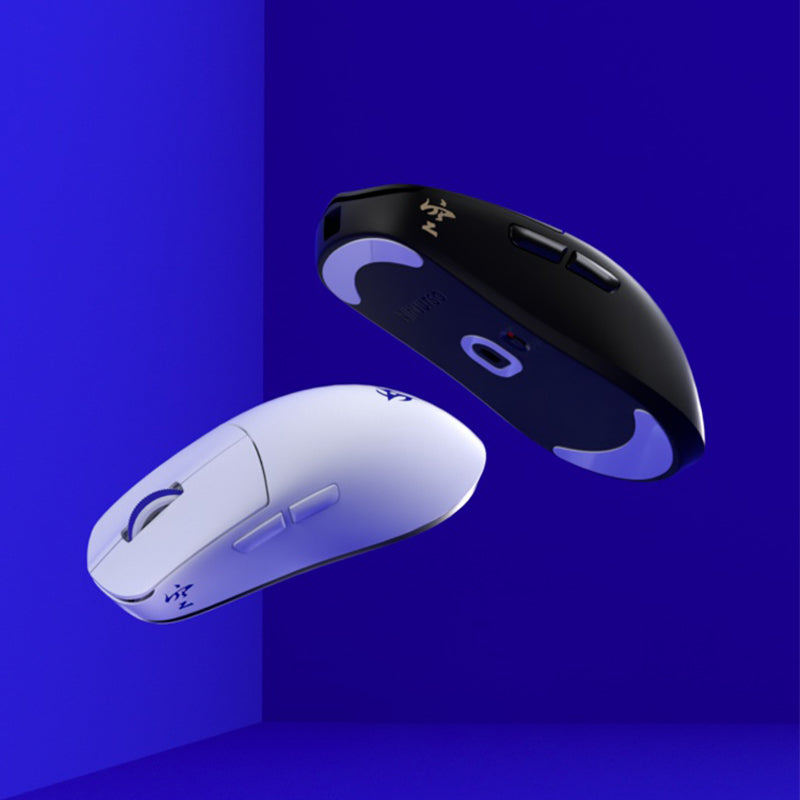
Not all mice support the claw grip equally. The wrong shape or weight can force poor posture and limit performance.
Key Features of a Claw-Friendly Mouse
- Shape: Look for a rear hump or cinched middle design that supports the palm heel while allowing fingers to arch forward
- Weight: Lightweight mice (under 50g) are ideal for fast flicks and reduced fatigue
- Grip coating: Textured or rubberized surfaces prevent slippage during aggressive movements
- Switch latency: Low-latency switches (like Kailh GX SPDT) ensure instant click registration
- Polling rate: 1000Hz or higher (up to 8000Hz) for smoother tracking
Avoid bulky, flat, or overly long mice. They encourage palm or fingertip styles instead.
Top Mice for Claw Grip in 2026
Best Overall: Ninjutso Sora V2
- Weight: Around 40g
- Shape: Broad rear hump, gently sloping sides
- Polling rate: Up to 8000Hz
- Why it works: The high back supports the palm heel, while the lightweight body enables explosive flicks. Ideal for medium to large hands.
Best Mid-Range: Scyrox V8
- Weight: Around 41g
- Shape: Aggressive rear curve, compact body
- Polling rate: 8000Hz supported
- Why it works: Designed for smaller hands, the steep hump locks the palm in place. Excellent for fast-paced FPS titles.
Best Budget Wired Option: Endgame Gear XM2 8k
- Weight: Around 65g, still responsive
- Shape: Cinched middle, raised central hump
- Switches: Kailh GX SPDT with Speed Mode (actuates on release)
- Why it works: Unbeatable click latency, durable build, and multiple grip coatings. A top performer per dollar.
Other Strong Options
- Logitech G PRO X SUPERLIGHT 2: Forgiving shape fits most hand sizes, but stock feet wear quickly
- Endgame Gear OP1 8k v2: Compact and precise, best for small-to-medium hands
- Corsair SCIMITAR RGB ELITE: 12 programmable side buttons, perfect for MMO claw grip setups
- Corsair NIGHTSWORD RGB: Rubberized shell and thumb rest enhance control in MOBAs
Avoid outdated models like the Logitech G305 or Cooler Master MM720. They’re heavier and slower by modern standards.
Fix Common Claw Grip Mistakes

Even with the right mouse, bad habits can sabotage your performance.
Stop Over-Gripping the Mouse
Squeezing the mouse like a stress ball is the leading cause of fatigue and shaky aim. Relax your hand. Your grip should be firm enough to control the mouse, but loose enough to allow quick finger lifts.
Pro Tip: Every 5 minutes, do a tension check by briefly opening and re-forming your grip to reset muscle tightness.
Prevent Hand Dragging
If your pinkie or palm drags across the mousepad, your hand is too flat. This creates friction and slows movement. Lift the front of your hand slightly so only the mouse feet glide. A low-friction mousepad, like a hard or hybrid surface, also helps.
Avoid Mouse Size Mismatches
A mouse that is too big forces your fingers to stretch, flattening your grip. A mouse that is too small over-curls your fingers, straining tendons.
Measure your hand from wrist to fingertip:
– Small (under 17cm): Try Scyrox V8 or OP1 8k v2
– Medium (17 to 19cm): Sora V2 or XM2 8k
– Large (over 19cm): Sora V2 or G PRO X SUPERLIGHT 2
Test different shapes. Some prefer a centered hump (XM2 8k), others a rear hump (Sora V2).
Practice Drills to Master Claw Grip
Switching grips takes time. Use these drills to build muscle memory.
Static Click Accuracy Drill
- Open a click test site
- Set sensitivity to 400 to 800 DPI
- Click rapidly with only your index finger, keeping the rest of your hand relaxed
- Goal: 8 to 10 clicks per second with minimal hand movement
This builds finger speed and reduces reliance on wrist or palm.
Flick Shot Training
- Load a flick shot scenario in Aim Lab or Kovaak’s
- Use only wrist and finger movements, keeping your elbow still
- Focus on returning to center quickly after each flick
- Practice 10 to 15 minutes daily
This trains explosive accuracy, essential for CS:GO or Valorant entries.
Drag-and-Release Skill Shot Drill
- In League of Legends practice tool, spam skill shots like Lux Q
- Use claw grip to drag the cursor and release at the right moment
- Goal: Improve consistency and reduce overshooting
This reinforces fine motor control and timing.
Maintain Comfort and Prevent Injury
The claw grip can cause strain if done incorrectly. Follow these prevention tips.
Take Micro-Breaks Every 20 Minutes
Set a timer to pause for 30 seconds. Shake out your hand, stretch your fingers, and reset your posture. This prevents cumulative tension.
Stretch Before and After Sessions
- Finger stretch: Press palms together, fingers pointing up, then slowly lower hands toward your body
- Wrist flexor stretch: Extend arm, palm up, gently pull fingers back
- Forearm roll: Use a tennis ball to massage the underside of your forearm
Do each stretch for 20 to 30 seconds.
Adjust Your Setup for Ergonomics
- Chair height: Elbows at 90 degrees, forearms parallel to desk
- Mousepad size: Use a large pad (400mm x 600mm or bigger) to allow full arm movement
- Keyboard position: Keep it low and close to avoid reaching
A proper setup reduces strain and improves consistency.
Frequently Asked Questions About the Claw Grip
Is the Claw Grip Better Than Palm Grip for FPS Games?
The claw grip offers faster wrist movement and quicker clicks, while the palm grip provides more stability for precise tracking. Many tactical FPS players prefer palm grip for holding angles, while aggressive FPS players favor claw for flick shots. The best choice depends on your playstyle and hand size.
Can Small Hands Use the Claw Grip Effectively?
Yes, small hands can use the claw grip with the right mouse. Compact mice like the Scyrox V8 or Endgame Gear OP1 8k v2 are designed for smaller hands and support the arched finger position without forcing tendon strain.
How Long Does It Take to Get Used to the Claw Grip?
Most players need two to four weeks of consistent practice to build muscle memory. Daily drills and gradual adjustments help speed up the transition. If you feel pain rather than mild fatigue, stop and reassess your posture or mouse fit.
Does the Claw Grip Cause Hand Pain or RSI?
Poor form can lead to repetitive strain injuries, but proper claw grip technique should not cause pain. Tension, locked fingers, and oversized mice are the main culprits. Take breaks, stretch regularly, and ensure your mouse matches your hand size.
Should I Lower My DPI When Switching to Claw Grip?
Lowering your DPI to 400 to 800 helps you control movements while building new muscle memory. Once the grip feels natural, you can experiment with higher sensitivities based on your game and preference.
What Is the Best Mouse for Claw Grip Under $100?
The Endgame Gear XM2 8k offers top-tier click latency and a claw-friendly shape at a competitive price. It’s heavier than wireless options but delivers excellent performance per dollar.
Key Takeaways for Mastering the Claw Grip
Learning how to claw grip mouse correctly comes down to three essentials: relaxed posture, proper hardware, and consistent practice. Keep your palm light, your fingers arched, and your wrist neutral. Pair these habits with a lightweight, claw-friendly mouse to unlock faster flicks and steadier aim.
There’s no single proof that the claw grip boosts skill for everyone. As community expert Shneiky notes, comfort matters most. If the grip feels natural and reduces strain, stick with it. Iterate slowly, prioritize relaxation over speed, and upgrade hardware only when your current mouse limits your movement.
Ready to upgrade your aim? Start today: lift your palm, arch your fingers, and run one drill for 10 minutes. Within a week, you’ll notice smoother tracking and quicker reactions. Whether you’re climbing ranks in Valorant or landing skill shots in League of Legends, the claw grip could be your missing edge.